SportsHQ
Features Sports Venues Use Cases Download
🇺🇸English (US) 🌐العربية 🇩🇪Deutsch 🇬🇷Ελληνικά 🇦🇺English (AU) 🇨🇦English (CA) 🇬🇧English (UK) 🇮🇳English (IN) 🇸🇬English (SG) 🇪🇸Español 🌎Español (Latinoamérica) 🇲🇽Español (México) 🇫🇷Français 🇮🇳हिन्दी 🇮🇩Indonesia 🇮🇹Italiano 🇯🇵日本語 🇰🇷한국어 🇳🇱Nederlands 🇧🇷Português (BR) 🇵🇹Português (PT) 🇷🇺Русский 🇸🇪Svenska 🇭🇰繁體中文 (HK) 🇹🇼繁體中文 (TW) 🇨🇳简体中文
Get the App
Home›FAQs›Account Deletion
Account Management

Delete Your Account

Permanently remove your Sports HQ account and all associated data — profile, event memberships, chats, follow lists, and ratings. Here's exactly how the process works, in three steps.

This can't be undone. Deleting your account removes all of your data from our system — including follow lists and ratings, event memberships, chats, and profile data. Once the deletion is confirmed, there is no way to recover your account.

1 Sports HQ Settings screen with the Delete Account option highlighted
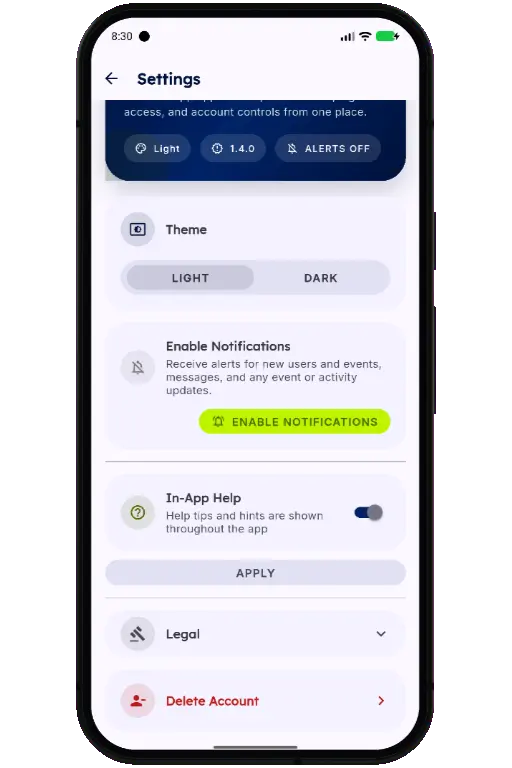
Open Settings and select Delete Account

→
2 Sports HQ screen for entering a reason and confirming account deletion
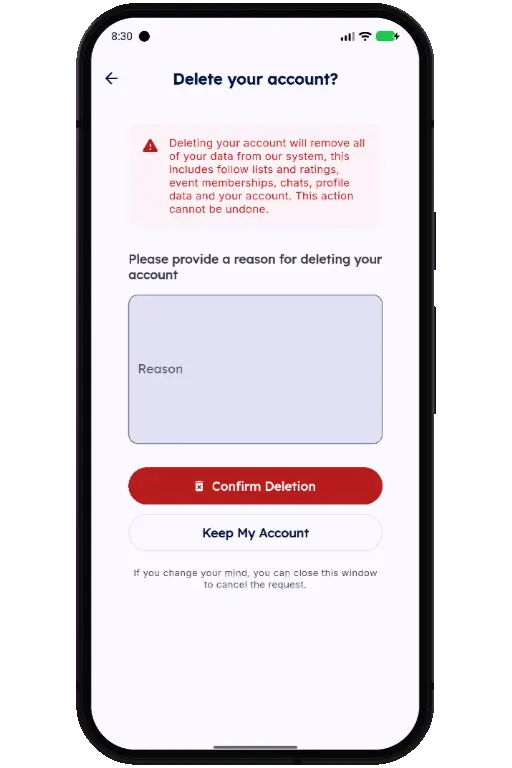
Add a reason (optional) and tap Confirm Deletion

→
3 Sports HQ screen for entering the emailed confirmation code
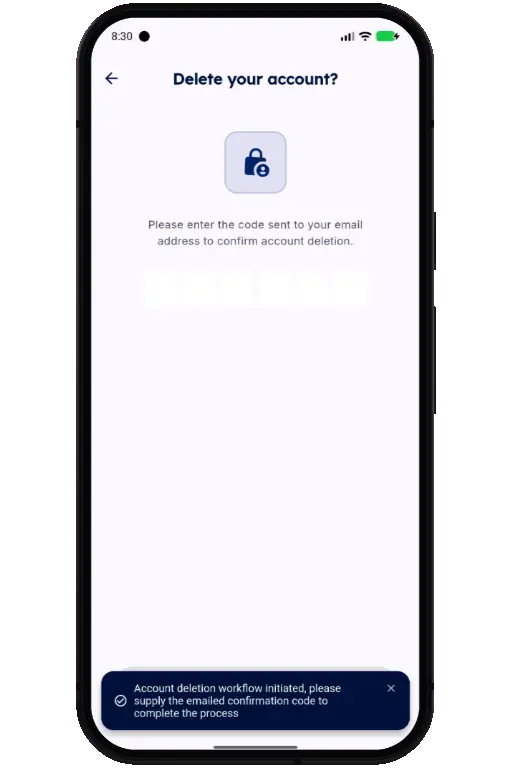
Enter the emailed code to permanently delete your account

What gets deleted

  • Your profile and account details
  • Follow lists and skill ratings
  • Event and activity memberships
  • Chat history

Changed your mind? Close the confirmation window at any point before entering the emailed code and your account will stay active. Need a hand? Contact support.

SportsHQ

Connecting athletes, events, and venues worldwide.

iOS App Android App
Product
Features Sports For Venues Use Cases Download
Support
FAQs Contact Us Twitter
Legal
Privacy Policy Terms of Service Account Deletion
© 2026 Sports HQ. All rights reserved. Available worldwide in 15+ languages